Sign in
Sign in using


 Steam
Steam  EA app
  Ubisoft
  Microsoft Store
  Software
 V Rising
3 hours ago
— บอส
Shin Megami Tensei V: Vengeance
5 hours ago
— eeY
DYNASTY WARRIORS: ORIGINS
11 hours ago
— Rachta
Marvel’s Spider-Man Remastered
1 day ago
— KORN
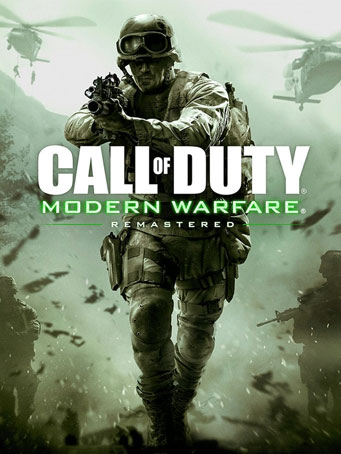
Call of Duty: Modern Warfare Remastered (2017)

Microsoft Store
-1202262159190.jpg)
-1202262159191.jpg)
-1202262159202.jpg)
-1202262159203.jpg)
One of the most critically-acclaimed games in history, Call of Duty: Modern Warfare is back, remastered in true high-definition, featuring improved textures, physically based rendering, high-dynamic range lighting and much more. Developed by Infinity Ward, the award-winning Call of Duty® 4: Modern Warfare® set a new standard upon its release for intense, cinematic action, while receiving universal praise as one of the most influential video games of all-time. Winner of numerous Game of the Year honors, Call of Duty 4: Modern Warfare became an instant classic and global phenomenon that set the bar for first-person shooters, and now it returns for a new generation of fans.
Relive one of the most iconic campaigns in history, as you are transported around the globe, including fan favorite missions "All Ghillied Up," "Mile High Club," and "Crew Expendable." You’ll suit up as unforgettable characters Sgt. John "Soap" MacTavish, Capt. John Price and more, as you battle a rogue enemy group across global hotspots from Eastern Europe and rural Russia, all the way to the Middle East. Through an engaging narrative full of twists and turns, call on sophisticated technology and superior firepower as you coordinate land and air strikes on a battlefield where speed and accuracy are essential to victory.
Additionally, team up with your friends in the online mode that redefined Call of Duty by introducing killstreaks, XP, Prestige and more in customizable, classic multiplayer modes.
Minimum Requirements
Release Date
27 JUL 2017There is no comment for Call of Duty: Modern Warfare Remastered (2017)
In order to use the key follow the instruction below:
1. Go to https://www.xbox.com
2. Login to your account
3. Hover over your account link (the top right of the screen) a menu will appear, click on the "Redeem Code" button.
4. On the next page, click "Redeem"
5. Enter your code
6. Click "Confirm"
7. Click "Confirm" again to assign the key to your account.
In order to download and install your game on Windows 10 follow the instructions below:
1. Using your Microsoft account, sign in to the PC where you want to install your games.
2. On the Start screen, select the Store icon.
3. In the Store, select Games from the menu.
4. Browse and select the game you want to install.