Yakuza Kiwami

Yakuza Kiwami

Yakuza Kiwami

Steam

Steam

1-5 minutes delivery time
Receive the key directly
Genre
฿ 449

Kazuma Kiryu takes the fall for a murder and emerges from prison 10 years later to yakuza clans on the brink of a war that hurtles you on an intense journey of love, humanity, and betrayal, fueled by your fists and unyielding resolve, set against a bustling red-light district in modern-day Japan.

Unleash Four Fighting Styles

Dynamically switch between four fighting styles (brutal "Brawler", speedy "Rush", overpowering "Beast", legendary "Dragon"), while utilizing makeshift weapons scattered around the streets to take down hordes of enemies in realistic fights that are exhilarating and fun for anyone to pick up and play.

Immerse Yourself in Japan

After breaking some faces, take a break from the main story to enjoy the immersive nightlife activities scattered throughout the city of Kamurocho, like karaoke, the casino, cabaret club, arcade, batting cages and more as you encounter colorful characters from all walks of life.

Minimum Requirements

  • OS: Windows 11
  • Processor: Intel Core i3-8100 3.6 GHz or AMD Ryzen 3 2300X 3.5 GHz
  • Memory: 8 GB RAM
  • Graphics: NVIDIA GeForce GTX 960 4 GB / AMD Radeon RX 460 4 GB / Intel Arc A380 6 GB
  • DirectX: Version 12
  • Storage: 31 GB available space
  • Additional Notes: Low 1080p @ 30 FPS. Requires a CPU which supports AVX and SSE4.2 instruction set.

Recommended Requirements

  • OS: Windows 11
  • Processor: Intel Core i5-8600K 3.6 GHz or AMD Ryzen 5 2500X 3.6 GHz
  • Memory: 16 GB RAM
  • Graphics: NVIDIA GeForce GTX 1070 8 GB / AMD Radeon RX Vega 56 8 GB / Intel Arc A750 8 GB
  • DirectX: Version 12
  • Storage: 31 GB available space
  • Additional Notes: High 1080p @ 60 FPS. Requires a CPU which supports AVX and SSE4.2 instruction set.

Release Date

12 DEC 2025

There is no comment for Yakuza Kiwami

Review Yakuza Kiwami (0 Reviews)
?
Review this game!

1. Click on this link and continue to finish installing Steam https://cdn.cloudflare.steamstatic.com/client/installer/SteamSetup.exe

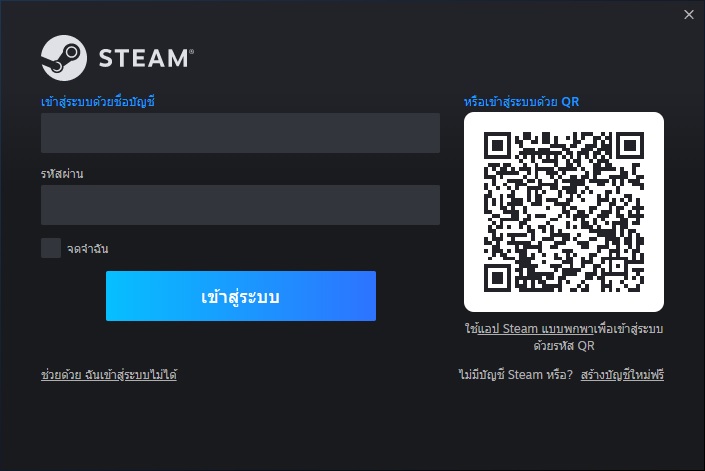
2. Run Steam and login or create an account

วิธีเปิดใช้งานเกม Steam

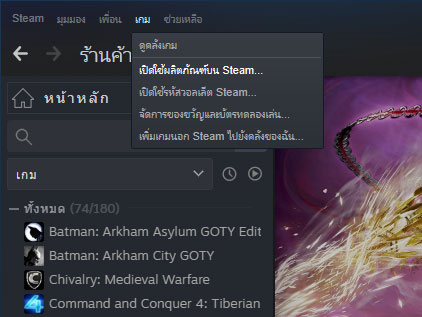
3. On the top left corner of the screen click on "Games" and select "Activate a product on Steam..."

วิธีเปิดใช้งานเกม Steam

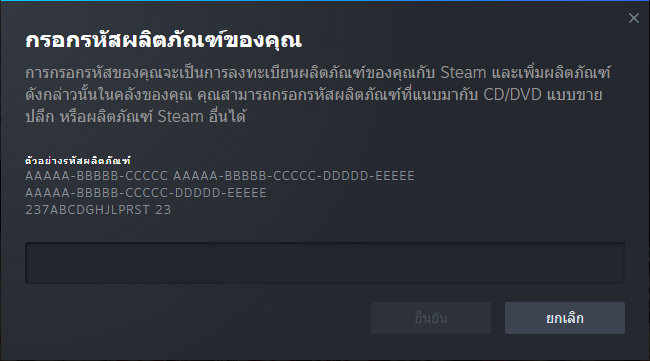
4. Click "Next" until you see the input form. Fill in your code then click "Next"

วิธีเปิดใช้งานเกม Steam

5. Your game activation is completed. Your game is ready to download. Once it's finished you'll be able to play the game immediately. Have fun!

ต้องการสอบถามข้อมูลใช่ไหม? ส่งข้อความถึงเราได้เลย!